

Hola devs, en el artículo anterior te enseñé qué son los background jobs, aquí lo implementaremos.
Envía emails sin hacer esperar al usuario. Procesa tareas pesadas en background. Los Background Jobs son la solución.
El Escenario
Imagina que trabajas en NotifyHub, una plataforma de notificaciones. Un cliente envía esto:
POST /api/emails
{
  "to": "cliente@empresa.com",
  "subject": "Tu pedido ha sido enviado",
  "body": "Gracias por tu compra..."
}
Sin Background Jobs: La API envía el email, el cliente espera 5 segundos.
Con Background Jobs: La API encola el email, responde en 50ms. El email se envía en segundo plano.
Estructura del Proyecto
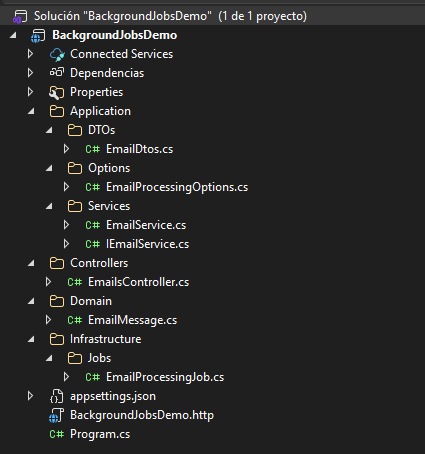
Código Fuente
Domain/EmailMessage.cs
La entidad representa cada email en cola. El enum EmailStatus define los estados posibles: Pending cuando llega, Processing cuando el worker lo está manejando, Processed cuando se completa exitosamente, y Failed después de agotar los reintentos. Los campos RetryCount y LastError permiten hacer seguimiento de fallos sin perder contexto.
namespace BackgroundJobsDemo.Domain;

public enum EmailStatus
{
    Pending,
    Processing,
    Processed,
    Failed
}

public class EmailMessage
{
    public int Id { get; set; }
    public string To { get; set; } = string.Empty;
    public string Subject { get; set; } = string.Empty;
    public string Body { get; set; } = string.Empty;
    public DateTime CreatedAt { get; set; }
    public EmailStatus Status { get; set; } = EmailStatus.Pending;
    public int RetryCount { get; set; }
    public string? LastError { get; set; }
}
Application/DTOs/EmailDtos.cs
Los DTOs (Data Transfer Objects) separan la interfaz pública del dominio interno. EmailRequestDto usa Required y EmailAddress para validación automática vía data annotations, así el controller no necesita validación manual. EmailResponseDto retorna solo id y status, manteniendo la respuesta mínima.
using System.ComponentModel.DataAnnotations;

namespace BackgroundJobsDemo.Application.DTOs;

public record EmailRequestDto(
    [Required(ErrorMessage = "Recipient 'To' is required")]
    [EmailAddress(ErrorMessage = "Invalid email format for 'To'")]
    string To,

    [Required(ErrorMessage = "Subject is required")]
    string Subject,

    string Body);

public record EmailResponseDto(int Id, string Status);
Application/Options/EmailProcessingOptions.cs
El patrón IOptions<T> de .NET permite externalizar configuración. En lugar de hardcodear intervalos o máximos de reintentos, estos valores viven en appsettings.json y se injectan vía DI. Así puedes ajustar el comportamiento sin recompilar.
namespace BackgroundJobsDemo.Application.Options;

public class EmailProcessingOptions
{
    public int PollingIntervalSeconds { get; set; } = 10;
    public int ProcessingDelayMilliseconds { get; set; } = 1000;
    public int MaxRetries { get; set; } = 3;
}
Application/Services/IEmailService.cs
using BackgroundJobsDemo.Application.DTOs;
using BackgroundJobsDemo.Domain;

namespace BackgroundJobsDemo.Application.Services;

public interface IEmailService
{
    Task<int> QueueEmailAsync(EmailRequestDto request);
    Task<IEnumerable<EmailResponseDto>> GetPendingEmailsAsync();
    Task<IReadOnlyList<EmailMessage>> GetAllPendingAsync();
    Task<bool> TryMarkAsProcessingAsync(int id);
    Task MarkAsProcessedAsync(int id);
    Task MarkAsFailedAsync(int id, string error);
}
Application/Services/EmailService.cs
La implementación usa una lista en memoria como cola. SemaphoreSlim protege el acceso thread-safe en operaciones async (preferible a lock en código asíncrono).
El método TryMarkAsProcessingAsync usa compare-and-swap semantics: solo marca como Processing si está en Pending, retornando false si ya fue adquirido por otro worker. Esto previene procesamiento duplicado sin necesidad de locks globales.
using BackgroundJobsDemo.Application.DTOs;
using BackgroundJobsDemo.Application.Options;
using BackgroundJobsDemo.Domain;
using Microsoft.Extensions.Options;

namespace BackgroundJobsDemo.Application.Services;

public class EmailService(
    IOptions<EmailProcessingOptions> options) : IEmailService
{
    private readonly List<EmailMessage> _queue = new();
    private int _nextId = 1;
    private readonly SemaphoreSlim _semaphore = new(1, 1);
    private int MaxRetries => options.Value.MaxRetries;

    public async Task<int> QueueEmailAsync(EmailRequestDto request)
    {
        var email = new EmailMessage
        {
            Id = _nextId++,
            To = request.To,
            Subject = request.Subject,
            Body = request.Body,
            CreatedAt = DateTime.UtcNow,
            Status = EmailStatus.Pending,
            RetryCount = 0
        };

        await _semaphore.WaitAsync();
        try { _queue.Add(email); }
        finally { _semaphore.Release(); }

        return email.Id;
    }

    public async Task<IEnumerable<EmailResponseDto>> GetPendingEmailsAsync()
    {
        await _semaphore.WaitAsync();
        try
        {
            return _queue
                .Where(e => e.Status == EmailStatus.Pending
                         || e.Status == EmailStatus.Processing
                         || e.Status == EmailStatus.Failed)
                .Select(e => new EmailResponseDto(e.Id, e.Status.ToString().ToLowerInvariant()))
                .ToList();
        }
        finally { _semaphore.Release(); }
    }

    public async Task<IReadOnlyList<EmailMessage>> GetAllPendingAsync()
    {
        await _semaphore.WaitAsync();
        try
        {
            return _queue
                .Where(e => e.Status == EmailStatus.Pending)
                .OrderBy(e => e.CreatedAt)
                .ToList();
        }
        finally { _semaphore.Release(); }
    }

    public async Task<bool> TryMarkAsProcessingAsync(int id)
    {
        await _semaphore.WaitAsync();
        try
        {
            var email = _queue.FirstOrDefault(e => e.Id == id && e.Status == EmailStatus.Pending);
            if (email == null) return false;
            email.Status = EmailStatus.Processing;
            return true;
        }
        finally { _semaphore.Release(); }
    }

    public async Task MarkAsProcessedAsync(int id)
    {
        await _semaphore.WaitAsync();
        try
        {
            var email = _queue.FirstOrDefault(e => e.Id == id);
            if (email != null) email.Status = EmailStatus.Processed;
        }
        finally { _semaphore.Release(); }
    }

    public async Task MarkAsFailedAsync(int id, string error)
    {
        await _semaphore.WaitAsync();
        try
        {
            var email = _queue.FirstOrDefault(e => e.Id == id);
            if (email == null) return;

            email.RetryCount++;
            email.LastError = error;
            email.Status = email.RetryCount >= MaxRetries
                ? EmailStatus.Failed
                : EmailStatus.Pending;
        }
        finally { _semaphore.Release(); }
    }
}
Infrastructure/Jobs/EmailProcessingJob.cs
El job hereda de BackgroundService e implementa ExecuteAsync. Cuando la aplicación se detiene por el Cancellation Token, se cancela y el loop termina.
El método ProcessEmailsAsync primero obtiene TODOS los pendientes (no solo uno), luego itera sobre ellos. Para cada uno, intenta adquirirlo con TryMarkAsProcessingAsync. Si retorna false (ya adquirido por otro worker o dejó de estar Pending), lo salta. Si retorna true, lo procesa y marca éxito o fracaso.
using BackgroundJobsDemo.Application.Options;
using BackgroundJobsDemo.Application.Services;
using Microsoft.Extensions.Options;

namespace BackgroundJobsDemo.Infrastructure.Jobs;

public class EmailProcessingJob(
    IEmailService emailService,
    ILogger<EmailProcessingJob> logger,
    IOptions<EmailProcessingOptions> options) : BackgroundService
{
    private readonly EmailProcessingOptions _options = options.Value;

    protected override async Task ExecuteAsync(CancellationToken stoppingToken)
    {
        logger.LogInformation("Email Processing Job started with interval of {Interval}s",
            _options.PollingIntervalSeconds);

        while (!stoppingToken.IsCancellationRequested)
        {
            try { await ProcessEmailsAsync(); }
            catch (Exception ex) { logger.LogError(ex, "Error processing emails batch"); }

            await Task.Delay(TimeSpan.FromSeconds(_options.PollingIntervalSeconds), stoppingToken);
        }

        logger.LogInformation("Email Processing Job stopped");
    }

    private async Task ProcessEmailsAsync()
    {
        var pendingEmails = await emailService.GetAllPendingAsync();

        if (pendingEmails.Count == 0)
        {
            logger.LogDebug("No pending emails");
            return;
        }

        logger.LogInformation("Processing {Count} pending emails", pendingEmails.Count);

        foreach (var email in pendingEmails)
        {
            var acquired = await emailService.TryMarkAsProcessingAsync(email.Id);
            if (!acquired) continue;

            try
            {
                logger.LogInformation("Processing email {EmailId} to {Recipient}", email.Id, email.To);
                await Task.Delay(_options.ProcessingDelayMilliseconds);
                await emailService.MarkAsProcessedAsync(email.Id);
                logger.LogInformation("Email {EmailId} sent successfully to {Recipient}", email.Id, email.To);
            }
            catch (Exception ex)
            {
                logger.LogWarning(ex, "Failed to process email {EmailId}, marking for retry", email.Id);
                await emailService.MarkAsFailedAsync(email.Id, ex.Message);
            }
        }
    }
}
Controllers/EmailsController.cs
using Microsoft.AspNetCore.Mvc;
using BackgroundJobsDemo.Application.DTOs;
using BackgroundJobsDemo.Application.Services;

namespace BackgroundJobsDemo.Controllers;

[ApiController]
[Route("api/[controller]")]
public class EmailsController(IEmailService emailService) : ControllerBase
{
    [HttpPost]
    public async Task<IActionResult> SendEmail([FromBody] EmailRequestDto request)
    {
        var id = await emailService.QueueEmailAsync(request);
        return Accepted(new EmailResponseDto(id, "queued"));
    }

    [HttpGet]
    public async Task<IActionResult> GetPendingEmails()
    {
        var emails = await emailService.GetPendingEmailsAsync();
        return Ok(emails);
    }
}
Program.cs
using BackgroundJobsDemo.Application.Options;
using BackgroundJobsDemo.Application.Services;
using BackgroundJobsDemo.Infrastructure.Jobs;

var builder = WebApplication.CreateBuilder(args);

builder.Services.AddControllers();
builder.Services.AddEndpointsApiExplorer();
builder.Services.AddSwaggerGen();
builder.Services.Configure<EmailProcessingOptions>(
    builder.Configuration.GetSection("EmailProcessing"));
builder.Services.AddSingleton<IEmailService, EmailService>();
builder.Services.AddHostedService<EmailProcessingJob>();

var app = builder.Build();

if (app.Environment.IsDevelopment())
{
    app.UseSwagger();
    app.UseSwaggerUI();
}

app.MapControllers();
app.Run();
appsettings.json
La sección EmailProcessing se mapea con IOptions<EmailProcessingOptions> vía GetSection("EmailProcessing"). Los valores incluyen defaults en la clase, así que no necesitas especificar todos. Aquí definimos polling cada 5 segundos (en producción sería más), delay de 1 segundo para simular envío y máximo 3 reintentos antes de marcar como failed.
{
  "Logging": {
    "LogLevel": {
      "Default": "Information",
      "Microsoft.AspNetCore": "Warning"
    }
  },
  "AllowedHosts": "*",
  "EmailProcessing": {
    "PollingIntervalSeconds": 5,
    "ProcessingDelayMilliseconds": 1000,
    "MaxRetries": 3
  }
}
Para ejecutar
cd BackgroundJobsDemo
dotnet run --project BackgroundJobsDemo
Corre la aplicación y abre Swagger.
Ejemplo de uso
Envías un email:
POST /api/emails
{
  "to": "maria@tiendavirtual.com",
  "subject": "Confirmación de pedido #12345",
  "body": "Hola Maria, tu pedido ha sido confirmado..."
}
Respuesta inmediata:
{
  "id": 1,
  "status": "queued"
}
Verificas el estado:
GET /api/emails
[
  { "id": 1, "status": "pending" }
]
Después de procesar: [] (vacío significa que ya se envió o falló)
Cómo funciona
Cliente → POST /api/emails → 202 Accepted (respuesta inmediata)
                               ↓
                    Cola en memoria (thread-safe)
                               ↓
              BackgroundService (cada 5 segundos)
                               ↓
                    Procesa TODOS los pendientes
                    (no solo 1)
                               ↓
                    ¿Falla? → Reintenta hasta 3 veces
                    ¿Sí? → [Failed] permanent
                    ¿No? → [Processed]
Flujo de estados
[Pending] → TryMarkAsProcessing → [Processing] → ¿Éxito?
                                              ├─ Sí → [Processed]
                                              └─ No → MarkAsFailed
                                                         ↓
                                              ¿3 reintentos?
                                              ├─ Sí → [Failed]
                                              └─ No → [Pending] (se reencola)
Cuándo usar IHostedService
Es ideal para:
- Envío de emails, SMS, notificaciones
- Procesamiento de imágenes o archivos
- Tareas programadas (reportes, backups)
- Sincronización con sistemas externos
No es ideal para:
- Cuando se quiere garantizar procesar cada mensaje una sola vez, sin duplicados ni pérdidas → usa message queues (RabbitMQ, Azure Service Bus)
- Alta escala (millones de ítems) → considera arquitectura message-based
- Persistencia survive a reinicios → usa base de datos o message broker
Todo el código de esta demo está en mi Github, no te olvides de darle estrella y seguirme!
Limitaciones de este demo
Este ejemplo usa cola en memoria. Los emails pendientes se pierden si la app se reinicia. En producción considera:
- Base de datos como cola persistente
- Message brokers (RabbitMQ, Azure Service Bus, AWS SQS)
- Considera usar Hangfire o Quartz.NET para scheduling avanzado
Resumen
Los Background Jobs con IHostedService procesan tareas pesadas sin bloquear al usuario. El cliente recibe respuesta inmediata mientras el sistema trabaja en background.
Código simple, integrado en .NET y funcional. Empieza con esto y escala a message brokers cuando la complejidad lo requiera.
Si esta entrada te ha gustado, compártelo, genio! 🙌🐿️
Créditos de imagen de portada: Foto de Mufid Majnun en Unsplash